Plugin Development
Plugin support is currently under development and in testing phase, the API may be subject to changes.
The RSD provides limited support for plugins, enabling third-party services to insert links into dedicated areas (plugin slots) within the user interface.
A simple example is available in research-software-directory/RSD-plugin-example.
Available plugin slots
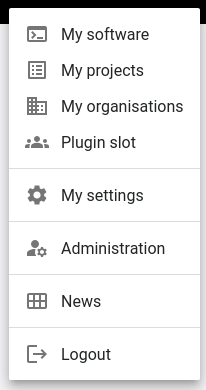
Plugin slots are currently available in the user menu:
and at the bottom of the software edit navbar:
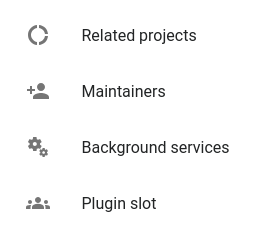
How plugins work
- Next.js performs GET requests to all registered plugins, to the endpoints
<baseUrl>/plugin/<plugin>/api/v1/config. ThebaseUrlis determined by the plugin name insettings.json. If a user is signed it, the token is sent in the header for authentication. The token contains adataattribute which can be used to determine which links should be displayed for each user. Users logged in via HelmholtzID have theireduPersonEntitlementsdelivered within thedataattribute. - If necessary, the plugin backend verifies the user token.
- The plugin backend returns a list of
PluginSlotthat need to be in the following format:wheretype PluginSlot={
slot: PluginSlot,
icon: string,
href: string,
title: string,
subtitle: string | null
}PluginSlotNamesis:type PluginSlot = 'userMenu' | 'editSoftwareNav' - The plugin slots are stored in the global
<RsdPluginContext>within the next app and can be accessed by the components.
Developing plugins
If the plugin requires a database, it can either use a new scheme in the existing database container, or provide its own.
If the plugin provides its own database and user authentication is required, the plugin backend needs access to the PGRST_JWT_SECRET so that it can verify the user token.
The backend of the plugin needs to be added to the reverse proxy configuration.